Change print settings
Select properties options
Choose from the following print settings
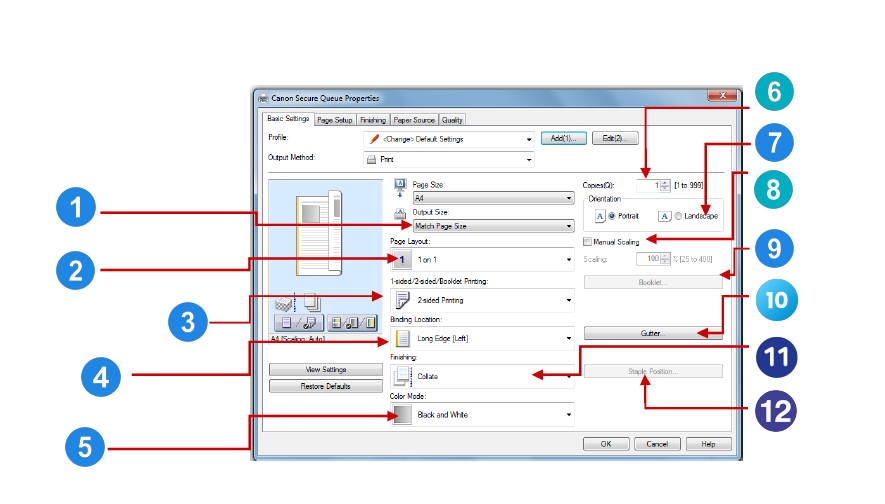
1. Output size
Allows you to reduce or enlarge your printed output.
2. Page layout
Allows you display more than 1 page on a sheet.
3. 1-sided/2-sided/Booklet printing
Choose to print either 1 or 2 sided or output as a booklet.
4. Binding location
Select from long edge or short edge to change the way your document is displayed when printing double sided e.g. Calendar style or booklet style.
5. Colour mode
Select to print your document in colour
6. Copies
Select number of copies required.
7. Orientation
Choose landscape or portrait.
8. Manual scaling
Allows you to reduce or enlarge in 1% increments (25 per cent to 400 per cent).
9. Booklet
Choose your print options to produce a booklet.
10. Gutter
Create a gutter on the document to allow for binding.
11. Finishing
Select collate to print your document insets (abc) (abc) or select group to print your document as sheets (aaa) (bbb). Choice of Staple and Collate.
12. Staple position
Activate staple under the finishing menu and then select staple position to change the staple location on your document.